What this is, in one minute
Claude is the AI made by Anthropic. Its Slides feature turns notes you already have into a real slide deck: a title slide, one slide for each point, and colors and fonts that go together. You paste the notes, say how many slides you want, and a few minutes later the deck opens next to the chat. You can change any word yourself, or ask Claude to change it for you.
It's free. Anthropic's help page says Slides is on every Claude plan, including Free, and we used a free account on 10/21, on a computer. Everything in this guide worked. Some older articles call it paid only. They were written while it was still being tested.
On a free account the deck stays private to you. There's no share link, but you can export a copy and send that.
Which way to use
Claude Slides starts from your own words. Other guides cover the jobs around it.
Use Claude Slides when
- You already have the content, in notes, an email or a document, and you need it as slides.
- You need a deck for a talk, a meeting or a class today, not next week.
- You'll finish it in PowerPoint or Google Slides anyway, and just want a good start.
Use something else when
Work with Gamma: You want a tool made only for presentations, with its own designs to choose from.
Read the guideDownload Claude: You don't have Claude yet, or you want the app on your computer. Slides works the same way there.
Read the guide
Your first deck, step by step
Our example: a volunteer who has 10 minutes to talk about the community garden at the local library, and a few lines of notes.
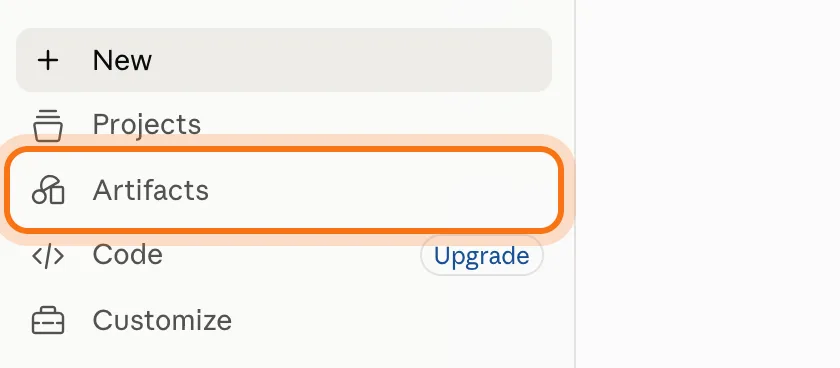
Step 1: Open Claude and click Artifacts
Go to claude.ai and sign in. A free account is enough. In the menu on the left, click "Artifacts".
Step 2: Click Slides
Under "Make something new" there are three cards: Docs, Slides and Design. Click "Slides". A new chat opens. The box says "What should this deck be about?" and has a "Claude Slides" label under it. If you don't want this chat in your history, click the ghost at the top right ("Use incognito") before you type. We did. The deck itself is still saved.

Step 3: Paste your notes and say how many slides
Paste your notes as they are. Rough is fine. At the end, add one line that says who the deck is for and how many slides you want, like "Turn these notes into a deck for a 10-minute talk at the library. 6 slides." Then press Enter.
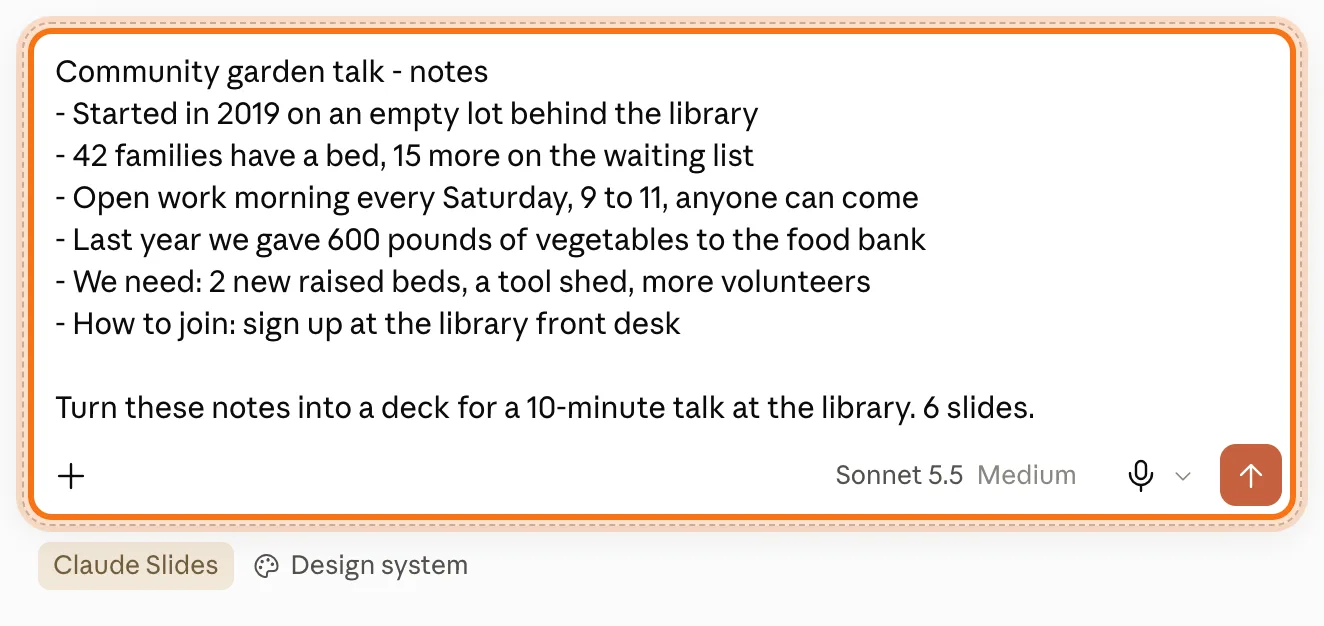
Step 4: Wait a few minutes. The deck opens next to the chat
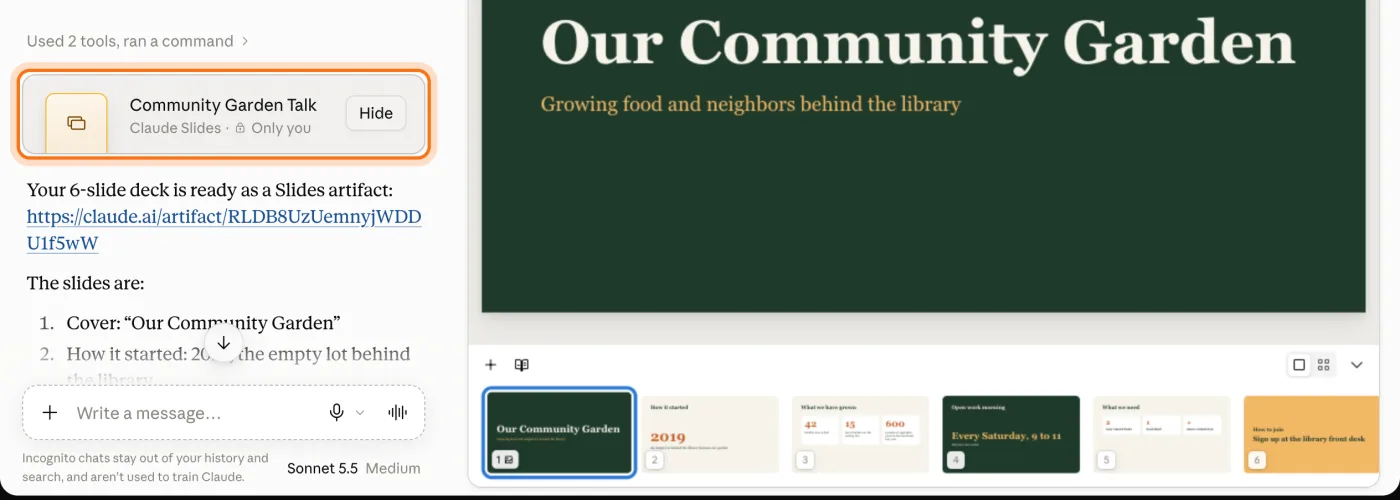
Claude works for a while. Ours took about 7 minutes to finish, so leave the tab open. A card with the deck's name shows up in the chat ("Claude Slides · Only you"), and the deck opens on the right: the slide big, and all the slides small along the bottom. Under the card, Claude lists what it put on each slide.
Step 5: Change any words yourself
Double-click the words on a slide. They turn into a text box with a small toolbar (Heading 1, bold, italic, underline, lists). Select the words and type over them. Press Escape when you're done. We changed the title to "Our Garden, Our Neighbors".

Step 6: Export it: PDF, PowerPoint or Google Slides
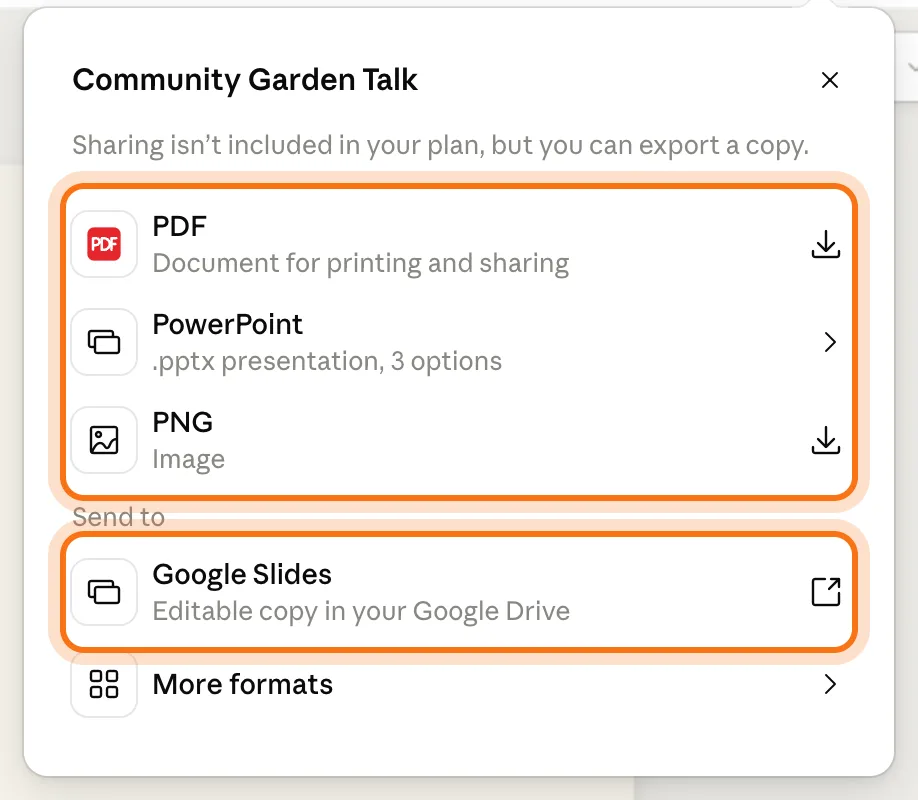
Click the black "Export" button at the top right. Choose "PDF" to print or email it, "PowerPoint" for a .pptx file (it has 3 options), or "PNG" for pictures of the slides. Under "Send to", "Google Slides" makes an editable copy in your Google Drive. On a free account the panel says "Sharing isn't included in your plan, but you can export a copy."
Members
The rest of this guide is for members
Create a free account and every room in the academy opens for 30 days. No credit card needed.
In the rest of this guide
8 decks to make, with prompts to copy
- A talk to a group
- A meeting update
- Training for new people
- A family event
- A small business pitch
- A school project
- A birthday or a tribute
- A long report, made short
More ways to use it
- Ask Claude to change it
- Check the change on the slide
- Add, copy, move or skip slides
- Present it inside Claude
- Move through the slides
- Find your deck again
- Make a deck from any chat
- On your phone
When something goes wrong, and how to fix it
- There's no Slides card under Artifacts
- It's been working for minutes
- The deck isn't open on the screen
- The words don't fit on a slide
- You deleted a slide by mistake
- There's no way to share a link
- "Design systems aren't available on your plan"
Where to go next
Claude made the deck. These guides help with what's around it.