What a Skill is, in one minute
A Skill is a saved set of instructions, and sometimes files, that teaches Claude how to do one kind of task. Anthropic describes it as a folder with a file called SKILL.md that says when to use it and what to do.
Claude doesn't read every Skill all the time. It sees each Skill's name and one-line description, and when your request matches one, it loads that Skill's instructions. So a Skill like "write our weekly customer update" kicks in when you ask for the weekly update, and stays out of the way otherwise.
Anthropic says Skills are for its paid plans: Pro, Max, Team and Enterprise. On the free account we used for the pictures, the Skills menu and Anthropic's own Skills were visible. This guide uses claude.ai on a computer.
When a Skill is the right tool
Claude has a few ways to remember how you work. Anthropic's own comparison is the simplest way to pick.
Make a Skill when
- You repeat the same kind of task with the same rules: a weekly report, a quote in your format, a reply in your brand's voice.
- The know-how should travel to any chat, and load only when it's needed, not sit in the background all the time.
- You want to share a way of working. Anthropic says Skills follow an open standard, so a Skill you write for Claude also works in other tools that adopt it.
Use something else when
Projects: It's background knowledge you want in every chat on one subject, like your price list or a client's files. Anthropic calls a project's knowledge "always loaded in that project's chats".
Read the guideA saved prompt: It's a one-off, or you're still figuring out the best way to ask. A good prompt in your notes comes first, and it can become a Skill later.
Read the guide
Your first Skill, in five steps
Here's the whole loop in claude.ai: find the Skills you have, look at one, use it in a chat, and make your own.
Step 1: See your Skills from the + menu
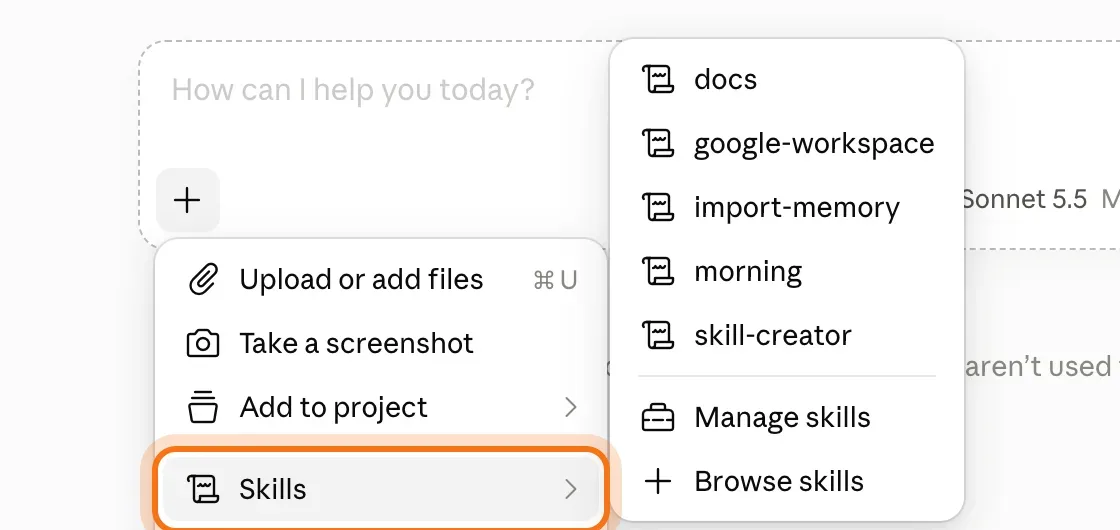
In a new chat, click + in the message box and point at "Skills". The list shows the Skills you have, and two links: "Manage skills" and "Browse skills". The ones in the picture, like "docs" and "skill-creator", come from Anthropic.
Step 2: Open Customize, then Skills
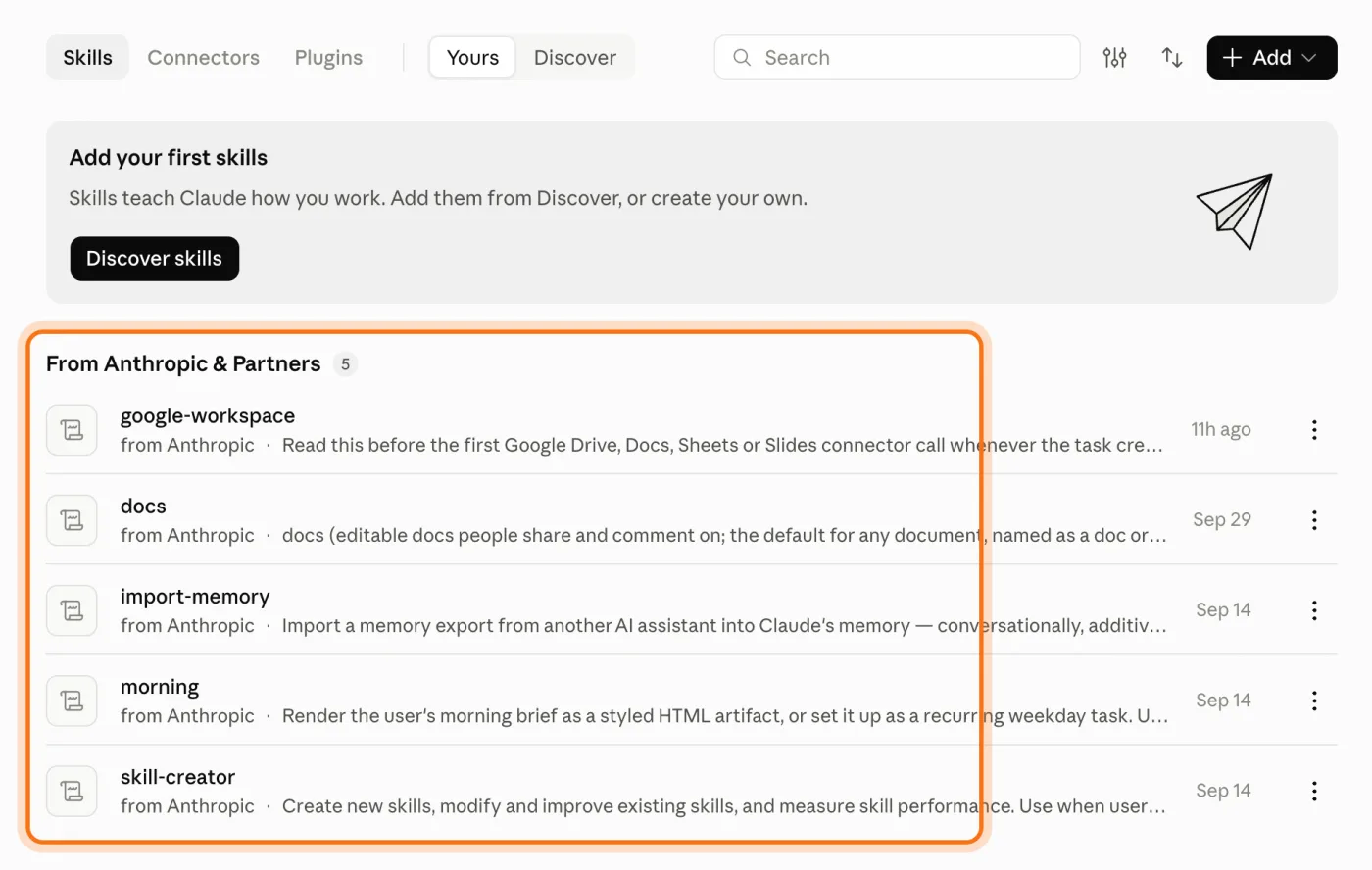
Click "Manage skills", or open "Customize" in the sidebar and choose "Skills". The "Yours" tab lists what you have, grouped by where it came from, like "From Anthropic & Partners". The "Discover" tab lists Skills you can add.
Step 3: Read a Skill before you turn it on
Open a Skill to see what it does, and turn it on with the switch at the top of its page. Anthropic's advice: Skills someone shares with you or that you upload aren't reviewed by Anthropic, so read its SKILL.md and files first. Skills also need "Code execution and file creation" turned on, under Settings, then "Capabilities".
Step 4: Use it in a chat
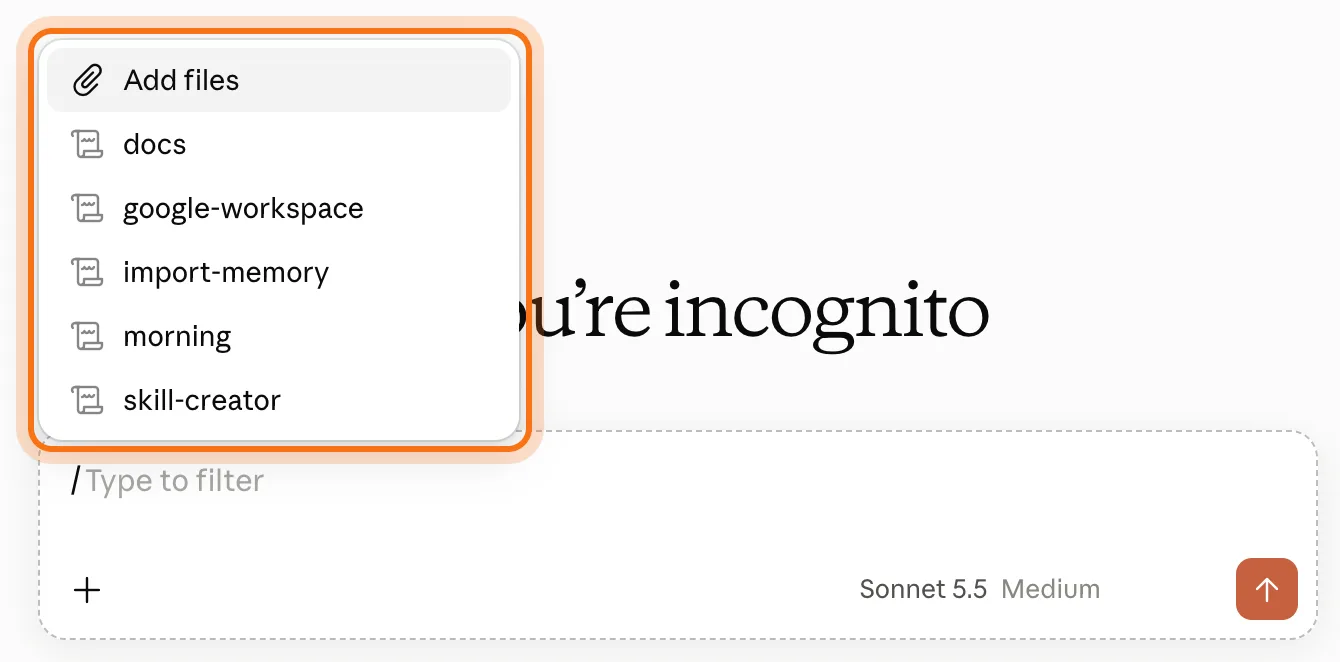
Just describe the task, and Claude loads a Skill that's turned on when your request matches its description. To pick one yourself, type / in the message box and choose it from the list.
Step 5: Make your own with Claude
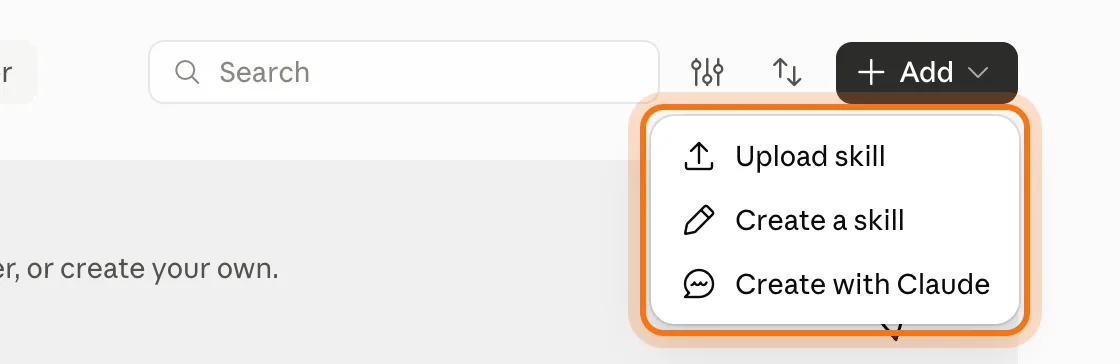
On the Skills page, click "Add". "Create with Claude" starts a chat where Claude asks how you do the task and writes the Skill for you. "Upload skill" adds one you already have, as a .zip file with a SKILL.md inside. Anthropic says custom Skills you upload are private to your account.
Try this prompt
Help me create a Skill for [the task]. Ask me how I do it today, what a good result looks like, and what to avoid, one question at a time. Then write the Skill.
Members
The rest of this guide is for members
Create a free account and every room in the academy opens for 30 days. No credit card needed.
In the rest of this guide
8 Skills a small business could use, with prompts to create them
- Write in your brand's voice
- Turn job notes into a quote in your format
- Write the weekly update for your team or clients
- Answer customer messages with your policies
- Plan a week of social posts
- Turn meeting notes into decisions and tasks
- Write product or menu descriptions
- Send friendly payment reminders
Things worth knowing
- The description decides when a Skill is used
- Anthropic's own Skills make documents
- Skills, plugins and connectors
- The same Skills work in Claude Code
When a Skill doesn't work, and how to fix it
- Claude doesn't use your Skill
- You can't use Skills at all
- Your upload is refused
- The Skill runs, but the result isn't what you wanted
- Someone sent you a Skill and you're not sure it's safe
- The Skill uses old prices or rules
- Two Skills fight over the same task
- You're not sure what to put in a Skill
Where to go next
A good Skill starts as a good prompt. These guides go further.