Why AI gets things wrong, in one minute
AI assistants like ChatGPT, Gemini and Claude don't look facts up the way a search engine does. They write the most likely answer, word by word. Most of the time that answer is right. When the tool doesn't know, it can write an answer that only sounds right, in the same confident tone.
The risky parts are the specific ones: dates, numbers and prices, names, quotes, links, laws and rules, and anything recent or local, like opening hours. OpenAI's own help center lists made-up quotes, citations and sources among ChatGPT's common mistakes. Writing, tone and ideas are much lower risk.
The answer isn't to stop using AI. It's a short habit: ask for the source, open it, and find the sentence that says it. For money, health and legal questions, the official source or a professional has the last word. The habits in this guide work in any AI tool.
Where to check: the AI you already use, or another tool
You don't need a special tool to fact-check. ChatGPT, Claude and Gemini can all show you where an answer came from. What matters is that you open the source and read it.
Check in the AI you already use when
- You want a quick answer with a link. Turn on "Web search" in the + menu of ChatGPT or Claude, and ask for the source.
- You want to check a summary against your own document. Upload the file and ask for the exact lines.
- You want a second opinion. Ask the same question in another assistant. ChatGPT, Gemini and Claude all have free plans.
Reach for another tool when
Perplexity: You want the sources first. Perplexity searches the web as you ask, and every answer shows the pages it used, with links to the originals. It may ask you to sign up after a question or two.
Read the guideGemini Notebook: You want answers only from your own files. Google's Gemini Notebook, formerly NotebookLM, answers from the sources you add and shows the quoted text when you point at a citation.
Read the guide
Check an answer in five steps
Here's the whole routine on a real question: a contractor checking this year's IRS mileage rate for business driving. It works the same way for any fact that matters.
Step 1: Turn on web search
In ChatGPT, click + next to the message box and choose "Web search". Now it reads current web pages instead of answering from memory, and it can link to where the answer came from. Claude has it in the same place: + and "Web search".
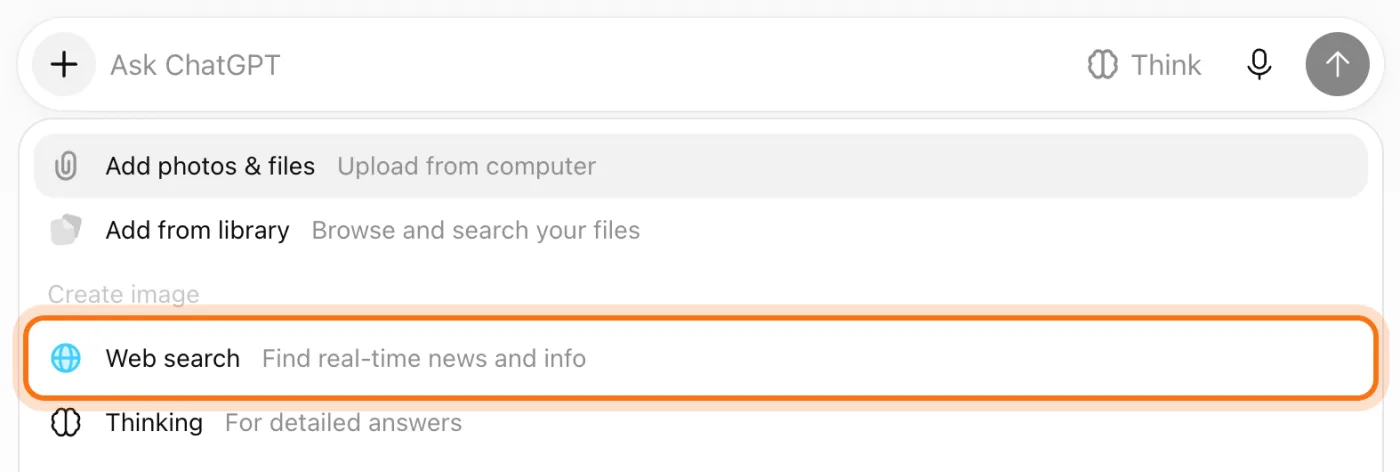
Step 2: Ask, and ask for the source
Ask your question and add one line: show me the source. A short answer with one link is much easier to check than a long one.
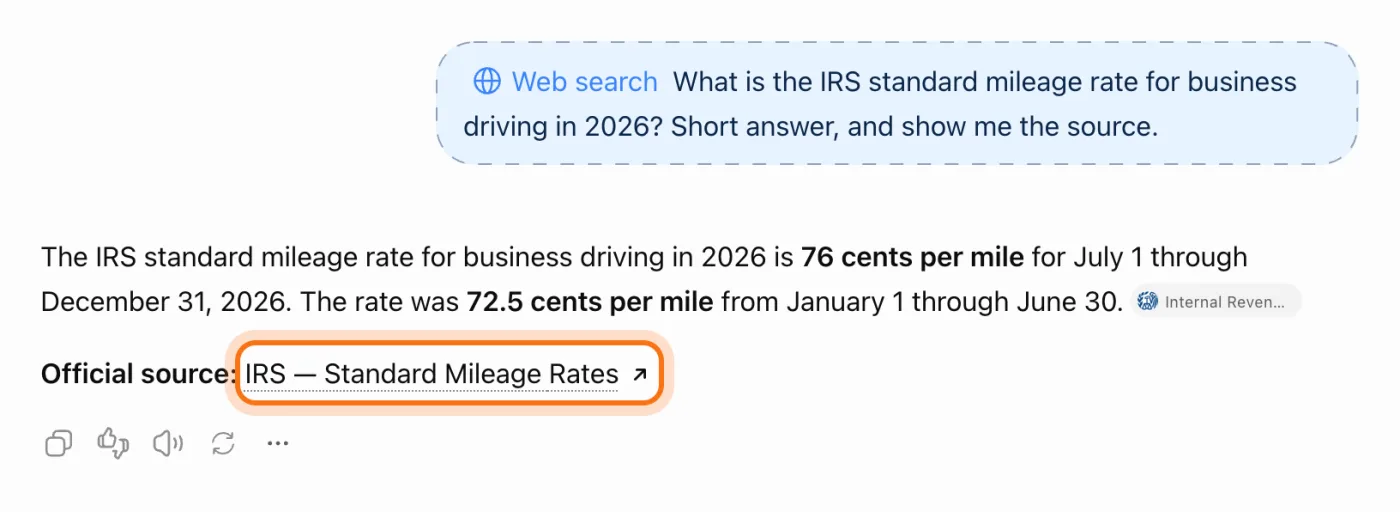
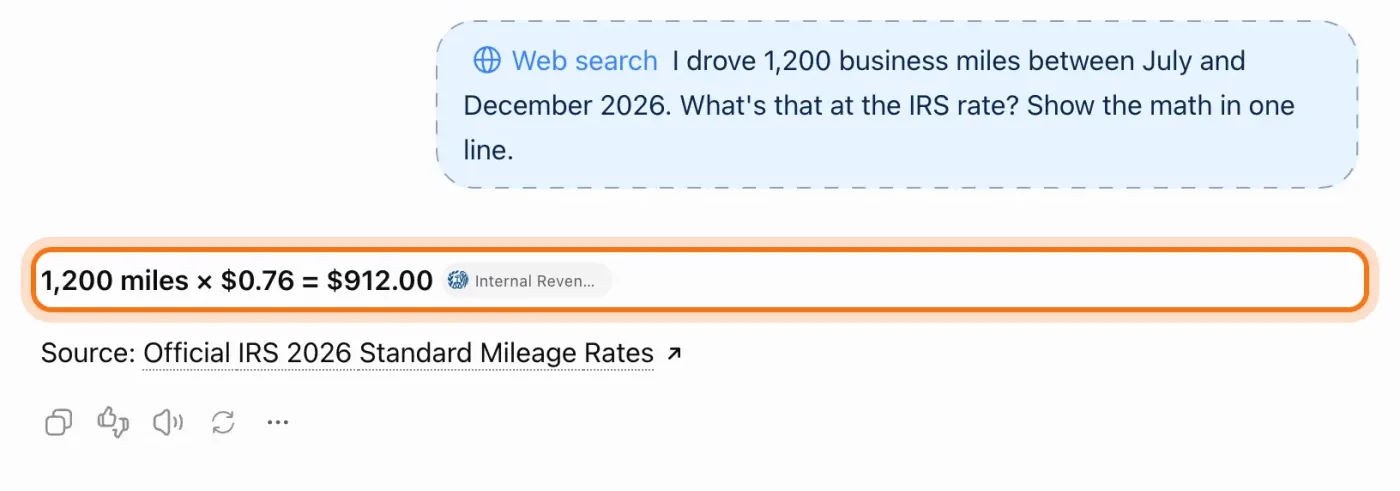
The example in the picture: a contractor asking for the IRS standard mileage rate for business driving in 2026.
Try this prompt
[Your question]. Give me the short answer first, then the source you used, with the link.Step 3: Open the source and find the sentence
Click the link. A link only counts once you've found the sentence that says what the AI said. Press Ctrl+F (Command+F on a Mac) and type a word or number from the answer to jump to it. Check the date on the page too. Here, the IRS table shows the same two rates for 2026 that the answer gave, one for each half of the year. Match the dates, not just the number. A shorter answer might give you only one of them.
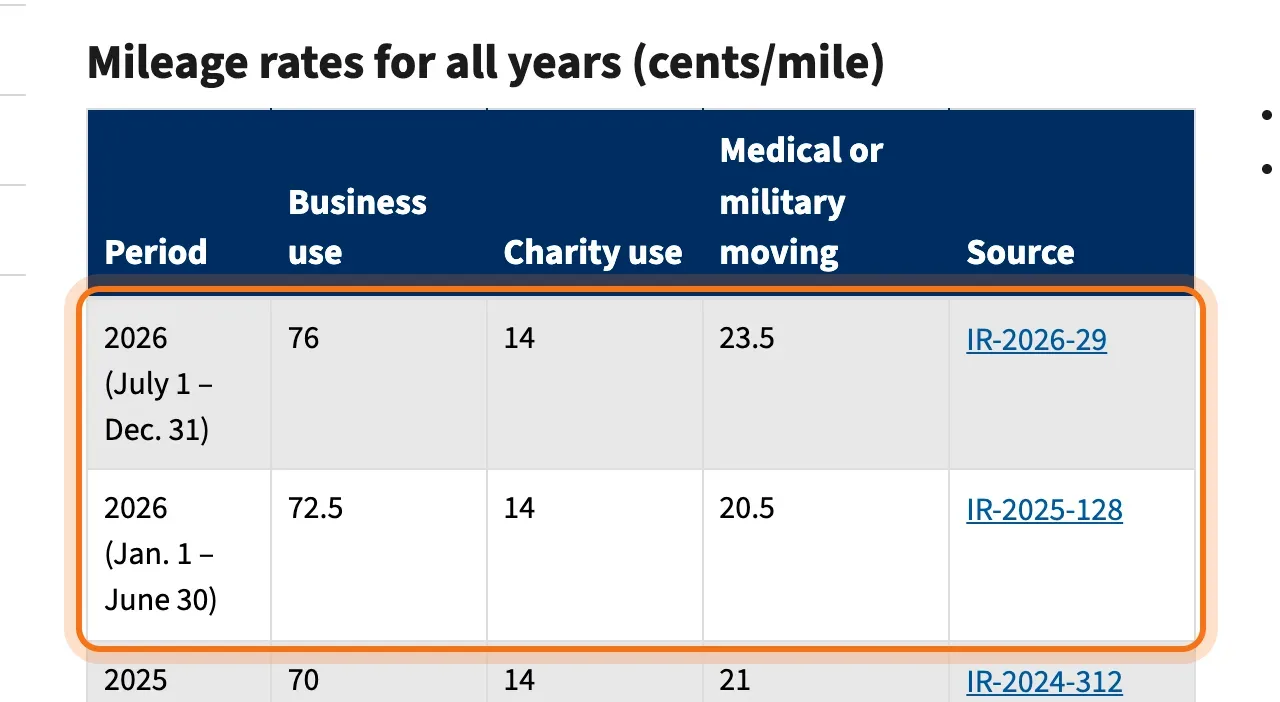
For money, health and legal questions, make sure the source is the official one: the government agency, the law itself, or the company's own page. Or ask a professional.
Step 4: Ask a second tool the same question
Paste the same question into another assistant, like Claude or Gemini. If both answers match the source, you're done. If they disagree, don't pick the one you like better. The official source decides. Look at what each tool used, too. In the picture, Claude gives the same two rates, but its sources are a benefits organization and an earlier IRS announcement, and it says so and points you to the IRS's own page. A page about the source is not the source.
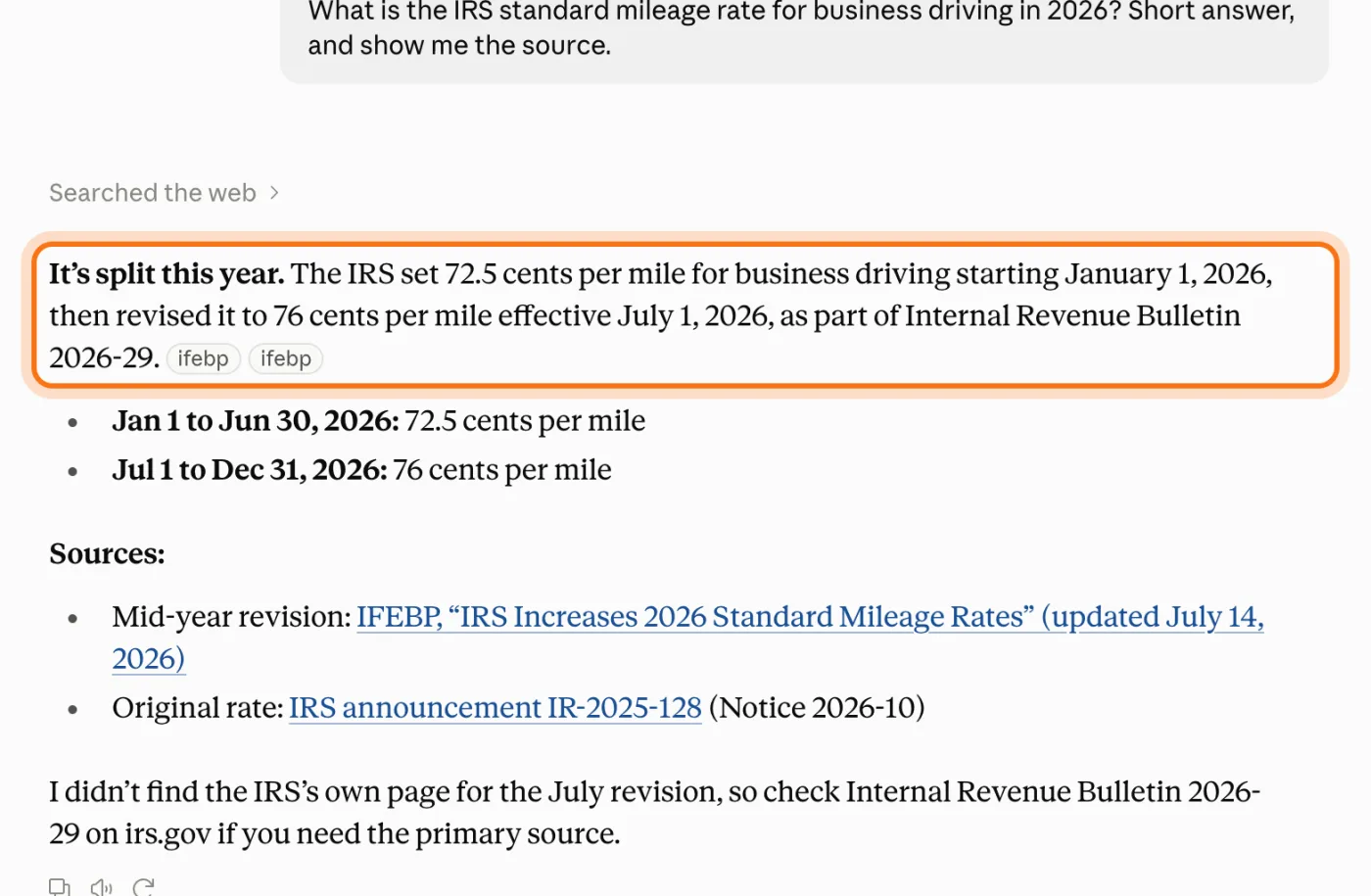
Step 5: Do the math yourself
When the answer includes a total, ask the AI to show the math, then do it once on a calculator. AI writes numbers the same way it writes words, so a total can look exact and still be off.
Try this prompt
Show me the math step by step, and tell me where each number came from.
Members
The rest of this guide is for members
Create a free account and every room in the academy opens for 30 days. No credit card needed.
In the rest of this guide
8 real jobs to fact-check, with prompts to copy
- Check a business rule or deadline
- Check a quote before you post it
- Check a number before you repeat it
- Check a product claim
- Check a food safety or health tip
- Check an AI summary against the document
- List every fact in your own draft
- Check a story someone forwarded
Checking habits worth knowing, in real tools
- Point at a link to see where it goes
- A second opinion that starts with sources: Perplexity
- Check that web search is on in Claude
- Match the sentence to its source
- Ask what you should check
When the check doesn't add up, and what to do
- The link is real, but the page doesn't say what the AI said
- The link is dead, or the page doesn't exist
- Two tools give different answers
- A number looks exact, but it's wrong
- The answer is out of date
- It gives you a quote the person never said
- It agreed with something wrong in your question
- It says it checked, but there are no links
Where to go next
Checking is one half of using AI well. Clear requests are the other. These guides go deeper.